Reads the project
Components, wires, terminals, cables and nets come out as JSON: the AI knows what's in the schematic and where, sheet by sheet.
NEW Open source · Free · AI-ready
WireCraft is a free, open source electrical CAD for schematics, power distribution boards and industrial automation. Every command is built to be used by you and by an AI: you design, it draws, numbers and checks.
Artificial intelligence
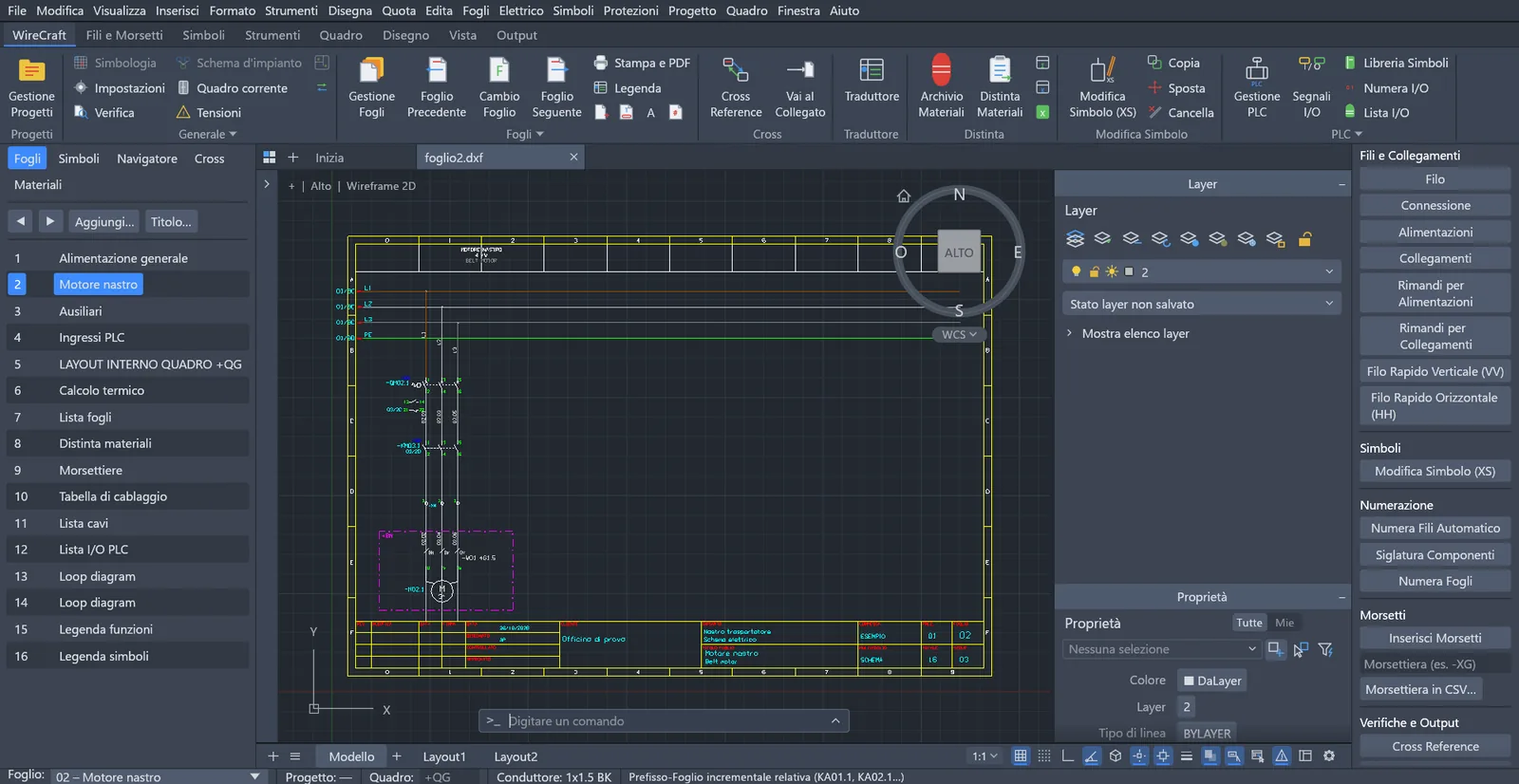
Traditional CAD tools are only windows and clicks. WireCraft also has a language: every command has a name, clear parameters and a structured answer. It's the same language AI assistants speak. So the AI does the repetitive work, and you keep the decisions.
Components, wires, terminals, cables and nets come out as JSON: the AI knows what's in the schematic and where, sheet by sheet.
Places symbols and wires, tags components, numbers wires, builds terminal strips, bill of materials and wiring table. One command per action, nothing hidden.
Cross reference with issues in red, duplicate wire numbers, protection and cable checks in single-line diagrams: the AI finds mistakes before commissioning.
Every change is a command you can read, undo and redo by hand. The AI saves you hours; the signature on the project stays yours.
you › On sheet 3 add start and stop for the conveyor with a run lamp. Then number the wires and update the bill of materials.
AI › Done. Here are the commands I ran:
cambiofoglio {"foglio": 3}
simbolo.sbnc {"at": [100,230], "funzione1": "Stop conveyor"}
simbolo.sbno {"at": [100,200], "funzione1": "Start conveyor"}
simbolo.km {"at": [100,140], "funzione1": "Conveyor motor contactor"}
simbolo.hl {"at": [220,140], "funzione1": "Run lamp"}
numerafili {"tutti": true}
uscita {"tipo": "distinta"}
✓ components tagged · wires numbered · bill of materials updated · cross reference clean
Example using WireCraft's real command names and parameters (in Italian). The 22-sheet sample project is generated by a sequence of commands like this.
Features
A complete electrical CAD for distribution boards, machines and industrial automation panels. If you come from a traditional electrical CAD, the workflow will feel familiar, in a lightweight program that starts in an instant.
Projects with multi-sheet drawings, A3 border and an auto-filled title block. Add, move or compact sheets: references follow.
Orthogonal wires with automatic junctions, power rails, cross-sheet references and 52 IEC 60617 symbols drawn from scratch. Delete a symbol and the wire closes.
Component tagging in six modes, automatic wire numbering, live cross reference, tree navigator and "go to linked".
Terminal strips placed with a line across wires, jumpers, connectors, cables with their cores and PLC I/O cards with addresses and bilingual comments.
Sheet index, bill of materials, terminal strips, wiring table, cable and I/O lists on the sheets, always updatable. Also in CSV and Excel.
From schematic to a scaled mounting plate, with DIN rails, cable ducts and dimensioned drilling. The door layout puts buttons and lamps on the front.
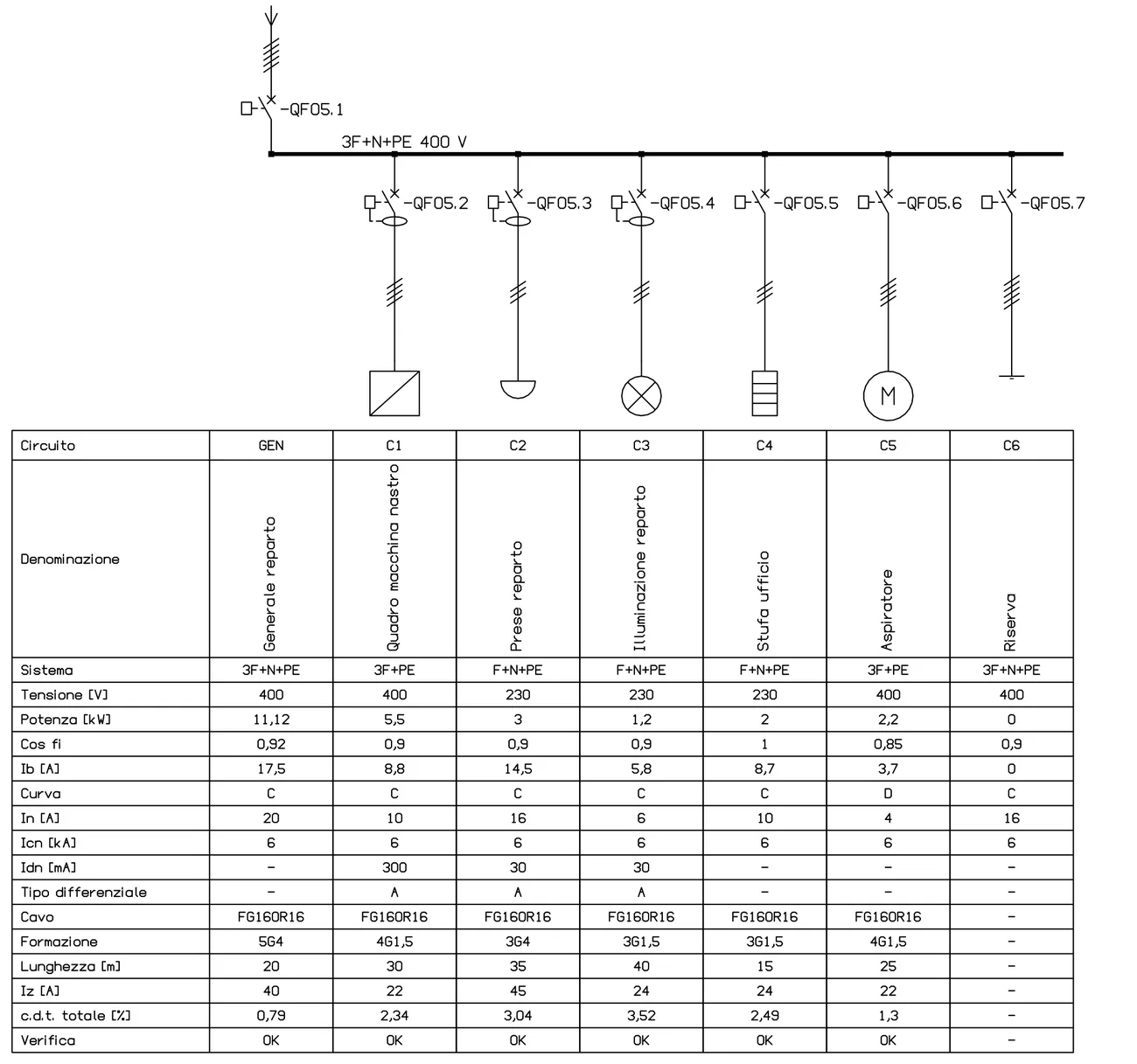
Distribution boards that size themselves: load current, protection rating, cable cross-section and voltage drop, with verification.
Dictionary in Italian, English, German, French and Spanish. A bilingual schematic with one command: functions, sheet titles and columns.
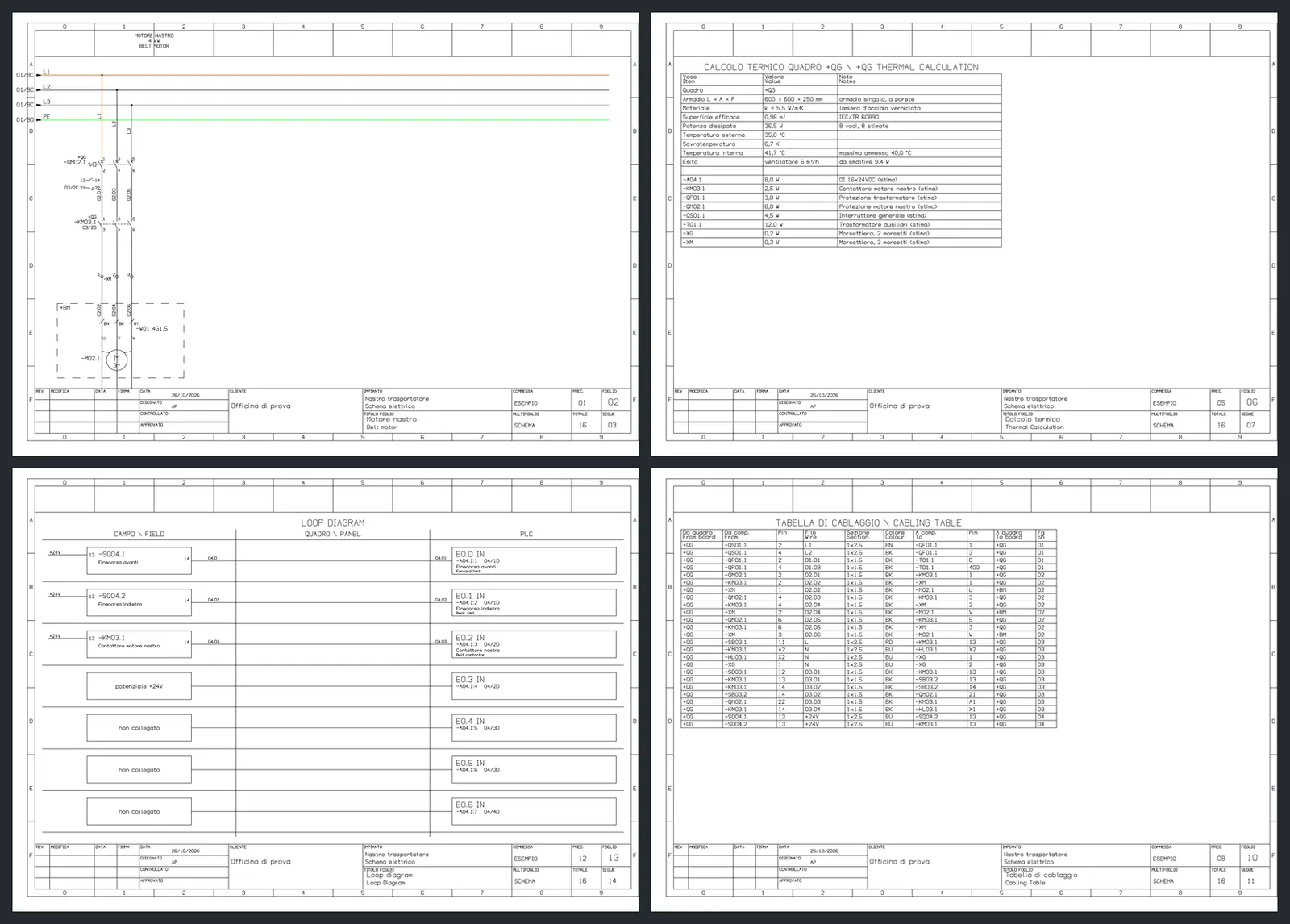
Dynamic PDF with sheet bookmarks and clickable references. Coloured wires and everything else in black, ready for the customer.
Gallery
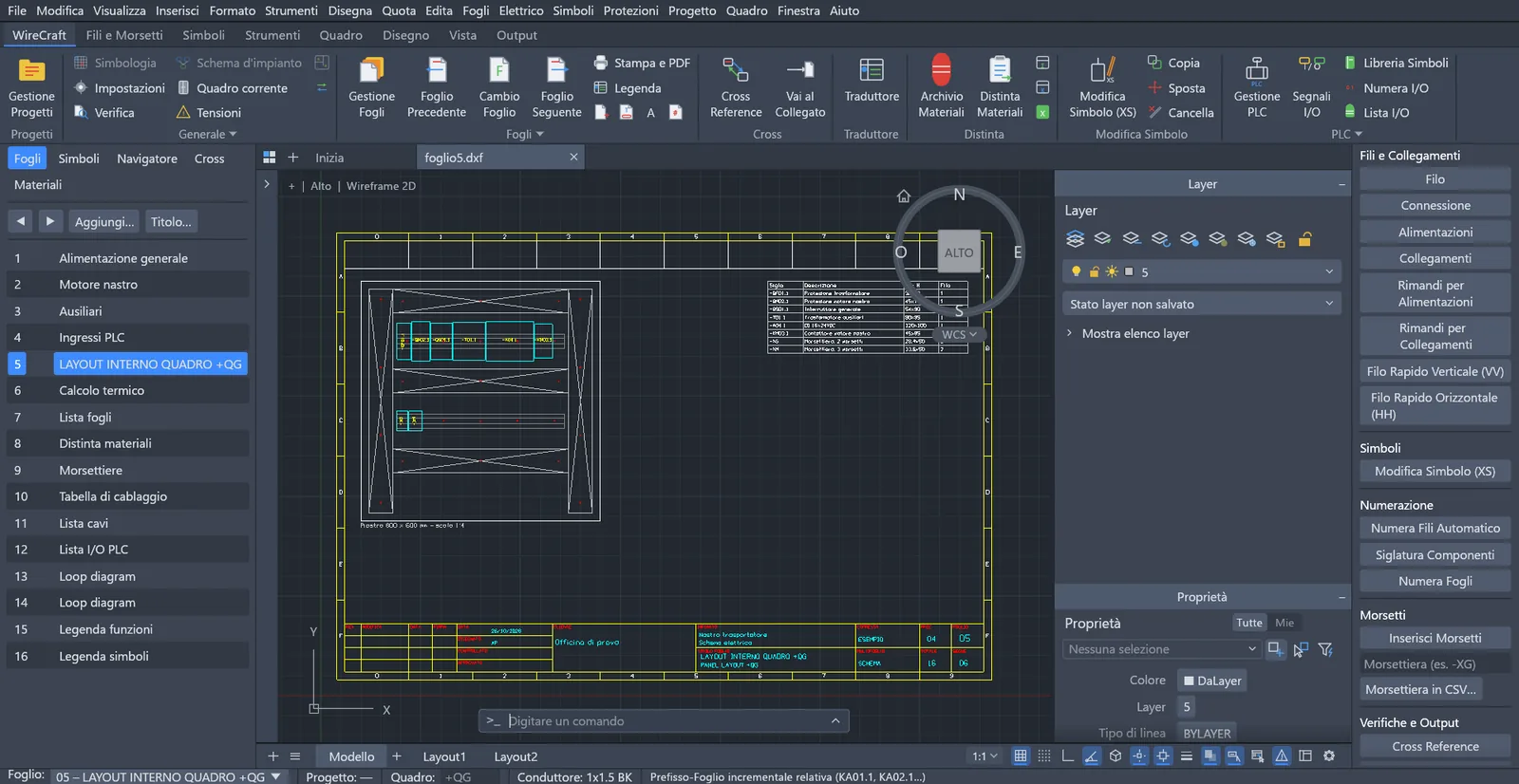
Components and terminal strips land on scaled DIN rails between cable ducts. The mounting plate picks itself from standard sizes.
Choose the load, power and line length: WireCraft proposes the protection rating and cable size, then checks everything.
Coloured-wire schematics, thermal calculation, loop diagrams and wiring tables, generated from the project and bilingual, in a PDF with clickable references.
Why open source
No yearly licenses, no closed formats, no third-party platform to buy first. Install it, use it, change it.
MIT or Apache-2.0 license: no subscription, no sheet or project limits.
Projects in DWG and DXF with data in attributes, lists in CSV and Excel, PDF for everyone.
Written in Rust: starts instantly and runs on modest PCs, with nothing else to install.
Open code on GitHub: suggest symbols, report issues, contribute.
Get started
Get the latest Windows 10/11 64-bit build from the GitHub Releases page.
Extract the ZIP and double-click wirecraft.exe. No installation, no account.
In the project manager press the sample project button: a complete plant opens, ready to browse and edit.
You need Rust 1.95 or later and the Visual Studio Build Tools (C++).
git clone --recurse-submodules https://github.com/edo023/WireCraft.git
cd WireCraft
scripts/aggiorna-cadcraft.sh        # prepares the CAD engine
cargo run --release -p wirecraft    # starts the program
Every command and its parameters are in the command guide (Italian).
WireCraft is alpha software and the executable is not yet code-signed: on first launch Windows may show "Windows protected your PC". Choose More info → Run anyway.
FAQ
Yes. WireCraft is open source under the MIT or Apache-2.0 license, your choice: use it for professional work with no licenses, subscriptions or sheet limits. You can also modify and redistribute it.
In WireCraft every command has a name and JSON parameters and returns a structured result. An AI assistant can write the sequence of commands that places symbols and wires, tags components, numbers wires and builds the lists, then read the cross reference to check the schematic. The 22-sheet sample project is built exactly this way.
The next step is connecting your assistant directly to the open project through the Model Context Protocol (MCP).
Yes, just like a person. That's why in WireCraft the AI never works behind your back: every change is a readable command you can review, undo and redo, and the cross reference flags issues. Decisions and responsibility stay with the designer.
WireCraft reads and writes DWG and DXF files and recognises sheets, titles, cross references, wires and contacts of existing schematics. Electrical data lives in block attributes, lists in CSV and Excel: your projects stay yours.
Not yet: the interface is currently in Italian, while the translator already produces schematics in English, German, French and Spanish. An English interface is a great place to contribute.
The ready-made executable is for 64-bit Windows 10 and 11. The code is written in Rust on a cross-platform CAD engine, CADCraft, so developers can build it from source elsewhere.
Yes. Besides machine and automation schematics, WireCraft draws single-line diagrams of distribution boards: incomer, busbars and outgoing circuits for sockets, lighting, motors, sub-boards and other loads, with their protective devices (MCBs, RCDs, isolators, fuses) and cables.
From the power and the line length it calculates the design current, proposes the protection rating and the cable cross-section (IEC 60364-5-52) and checks Ib ≤ In ≤ Iz, voltage drop and breaking capacity. Boards are then linked in the plant diagram and on the floor plan. Calculations assist the designer: final verification stays with the engineer who signs the project.
Symbols follow IEC 60617, reference designations IEC 81346 and cable sizing in single-line diagrams IEC 60364-5-52. Calculations assist the designer: final verification and compliance of the installation stay with the engineer who signs it.
Download WireCraft, open the sample project and try designing with AI by your side.